
- WhatsApp introduces a new feature to reset unread notifications on the home screen automatically.
- Users can manage the home screen badge count for unread messages or missed calls.
- This feature is currently rolling out to beta testers via the WhatsApp beta for Android update.
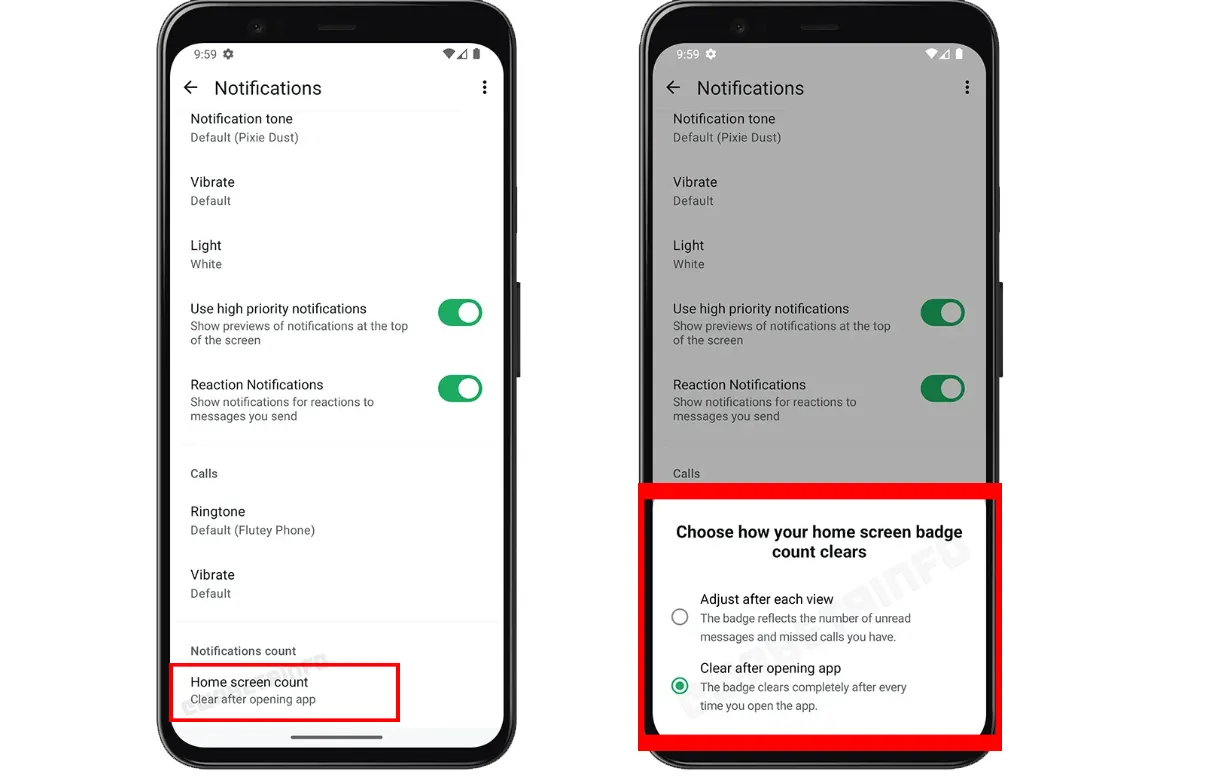
WhatsApp, a popular messaging app, is always striving to enhance user experience by introducing new features. One such addition aims to tackle the issue of unread notifications. With the constant flood of messages, keeping track of important conversations can be overwhelming, especially when unread notifications pile up. To make things easier, WhatsApp is testing a feature that allows users to manage their unread message badge count on the home screen, providing more control and flexibility.
This feature, available to beta testers on the latest WhatsApp beta for Android version 2.24.20.17, offers users two different options for managing the home screen badge. By allowing users to reset the unread message notifications, WhatsApp ensures that its users can focus on fresh and relevant conversations without being distracted by older, unread messages.

WhatsApp: New Feature for Managing Home Screen Count
The WhatsApp home screen badge count feature is currently being tested with beta users. It offers more control over how users handle their unread messages and missed call notifications. As part of this feature, users have two main options to choose from:
- Adjust Badge After Viewing: Users can opt for a more dynamic approach. Every time they open WhatsApp, the home screen badge will adjust to show the exact number of unread messages or missed calls that still require attention. This option is especially useful for those who want a real-time update on what they’ve missed, while also ensuring that they don’t lose sight of important unread notifications.
- Reset Badge After Opening the App: The second option is the default setting, where the home screen badge count completely resets every time WhatsApp is opened. Whether or not the user has read the messages, the unread message count is cleared once the app is accessed. This feature ensures a clutter-free home screen, making it a convenient choice for users who receive a large number of messages and prefer to clear notifications regularly.
This feature is rolling out to more beta testers in phases, making it a highly anticipated update for WhatsApp users. Those enrolled in the beta program can explore the options by updating to the latest version available on the Google Play Store.
Benefits of the New Home Screen Badge Management
- Clutter-Free Home Screen: For those who prefer a clear home screen, the ability to reset the unread badge count can be a real relief.
- Tracking Unread Messages: Users who want to keep track of important unread messages can adjust the badge count accordingly, ensuring they never miss an important notification.
- Flexible User Experience: Offering these two options provides users with the flexibility to choose how they want to manage their notifications, catering to different needs and preferences.
WhatsApp’s decision to roll out this new feature is another step towards improving user experience and making the app more adaptable to individual preferences. With more control over unread notifications, users can manage their messages more efficiently and reduce clutter on their home screens. Whether you prefer to reset the badge after each session or keep track of unread messages, this update gives you the power to tailor your WhatsApp experience.

As this feature gradually reaches more beta users, it is expected to become a widely appreciated addition to the app’s notification management system.
FAQ
What does the new WhatsApp home screen badge feature do?
It allows users to reset or adjust the unread message count on the home screen badge, providing more control over notifications.
How can I get this feature?
The feature is currently available to beta testers using the latest WA beta for Android. It will roll out to more users over time.
What are the two options for managing badge notifications?
Users can either adjust the badge count after each viewing session or reset it completely upon opening the app.


